 zhongqingsong
74c5b616a4
zhongqingsong
74c5b616a4
1. According to the English version of the document, complete the left texts.
2. Fix some inaccurate word, such as field, old CN is variable(变量),  inadequacy. signer, old CN is somebody(人), now it's something(者)。
3. Fix improper use of symbols, Lack of symbols in some place, some EN symbol translate to CN symbol.
4. Other change

JADX




jadx - Dex to Java decompiler
Command line and GUI tools for producing Java source code from Android Dex and Apk files
Main features:
- decompile Dalvik bytecode to java classes from APK, dex, aar, aab and zip files
- decode
AndroidManifest.xmland other resources fromresources.arsc - deobfuscator included
jadx-gui features:
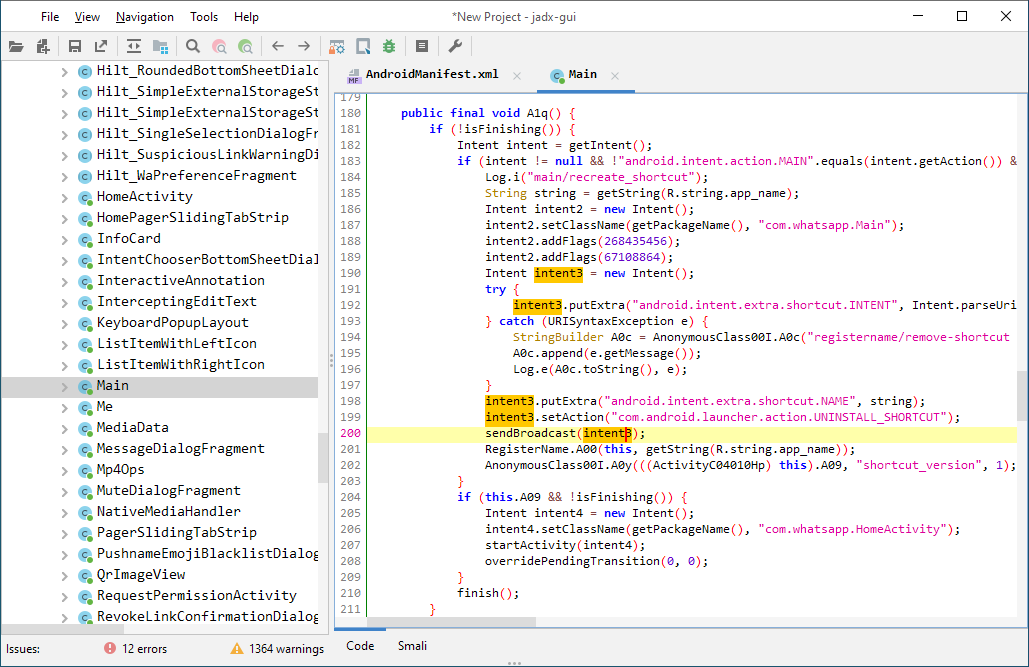
- view decompiled code with highlighted syntax
- jump to declaration
- find usage
- full text search
- smali debugger (thanks to @LBJ-the-GOAT), check wiki page for setup and usage
See these features in action here: jadx-gui features overview
Download
- release from github:

- latest unstable build
After download unpack zip file go to bin directory and run:
jadx- command line versionjadx-gui- UI version
On Windows run .bat files with double-click
Note: ensure you have installed Java 11 or later 64-bit version.
For windows you can download it from oracle.com (select x64 Installer).
Install
- Arch linux
sudo pacman -S jadx - macOS
brew install jadx
Build from source
JDK 8 or higher must be installed:
git clone https://github.com/skylot/jadx.git
cd jadx
./gradlew dist
(on Windows, use gradlew.bat instead of ./gradlew)
Scripts for run jadx will be placed in build/jadx/bin
and also packed to build/jadx-<version>.zip
Usage
jadx[-gui] [options] <input files> (.apk, .dex, .jar, .class, .smali, .zip, .aar, .arsc, .aab)
options:
  -d, --output-dir                    - output directory
  -ds, --output-dir-src               - output directory for sources
  -dr, --output-dir-res               - output directory for resources
  -r, --no-res                        - do not decode resources
  -s, --no-src                        - do not decompile source code
  --single-class                      - decompile a single class
  --output-format                     - can be 'java' or 'json', default: java
  -e, --export-gradle                 - save as android gradle project
  -j, --threads-count                 - processing threads count, default: 4
  --show-bad-code                     - show inconsistent code (incorrectly decompiled)
  --no-imports                        - disable use of imports, always write entire package name
  --no-debug-info                     - disable debug info
  --add-debug-lines                   - add comments with debug line numbers if available
  --no-inline-anonymous               - disable anonymous classes inline
  --no-inline-methods                 - disable methods inline
  --no-replace-consts                 - don't replace constant value with matching constant field
  --escape-unicode                    - escape non latin characters in strings (with \u)
  --respect-bytecode-access-modifiers - don't change original access modifiers
  --deobf                             - activate deobfuscation
  --deobf-min                         - min length of name, renamed if shorter, default: 3
  --deobf-max                         - max length of name, renamed if longer, default: 64
  --deobf-cfg-file                    - deobfuscation map file, default: same dir and name as input file with '.jobf' extension
  --deobf-rewrite-cfg                 - force to ignore and overwrite deobfuscation map file
  --deobf-use-sourcename              - use source file name as class name alias
  --deobf-parse-kotlin-metadata       - parse kotlin metadata to class and package names
  --rename-flags                      - fix options (comma-separated list of):
                                         'case' - fix case sensitivity issues (according to --fs-case-sensitive option),
                                         'valid' - rename java identifiers to make them valid,
                                         'printable' - remove non-printable chars from identifiers,
                                        or single 'none' - to disable all renames
                                        or single 'all' - to enable all (default)
  --fs-case-sensitive                 - treat filesystem as case sensitive, false by default
  --cfg                               - save methods control flow graph to dot file
  --raw-cfg                           - save methods control flow graph (use raw instructions)
  -f, --fallback                      - make simple dump (using goto instead of 'if', 'for', etc)
  --comments-level                    - set code comments level, values: none, user_only, error, warn, info, debug, default: info
  --log-level                         - set log level, values: quiet, progress, error, warn, info, debug, default: progress
  -v, --verbose                       - verbose output (set --log-level to DEBUG)
  -q, --quiet                         - turn off output (set --log-level to QUIET)
  --version                           - print jadx version
  -h, --help                          - print this help
Examples:
  jadx -d out classes.dex
  jadx --rename-flags "none" classes.dex
  jadx --rename-flags "valid, printable" classes.dex
  jadx --log-level ERROR app.apk
These options also worked on jadx-gui running from command line and override options from preferences dialog
Troubleshooting
Please check wiki page Troubleshooting Q&A
Contributing
To support this project you can:
- Post thoughts about new features/optimizations that important to you
- Submit decompilation issues, please read before proceed: Open issue
- Open pull request, please follow these rules: Pull Request Process
Licensed under the Apache 2.0 License